
 Erica
Erica
Instagram analytics software tracks how your content performs, who your audience is and whether your account is growing. Before you pay for any of it, it helps to know that Instagram gives professional accounts a free set of insights, so a paid tool has to offer something that built-in data does not. If you run Instagram for a business, our guide to promoting a business on Instagram covers where analytics fit.
This guide covers Instagram’s own analytics and the main third-party options. It replaces a 2019 list of five tools. Prices and features were read from each provider’s own page on 21 October 2026 and can change. SUEVU did not buy, sign up for or test any of these tools. This is desk research.
Quick answer: start with Instagram’s own dashboard, which costs nothing and needs a professional account. Move to a third-party tool when you need longer history, competitor tracking or client reports. Of the tools we checked, Metricool and Iconosquare list free or low-priced entry plans, while Sprout Social and Hootsuite are priced per user. Analytics tools that read your data through Meta’s official connection carry little account risk.
Which metrics matter
Follower count is the easiest number to see and the least informative. These are more useful, and most tools below report them in some form:
- Engagement. Likes, comments, shares and saves relative to your audience. It shows what people respond to. Our guide to increasing engagement on Instagram covers how to act on it.
- Reach. How many different accounts saw your content, which tells you how widely the algorithm is showing it. See how the Instagram algorithm works for what influences it.
- Audience. Location, age, gender and when followers are active. Use it to choose posting times, then compare against our notes on how often to post.
- Website clicks. If the goal is traffic, track what happens after the tap. Some tools report link-in-bio clicks.
The tools compared
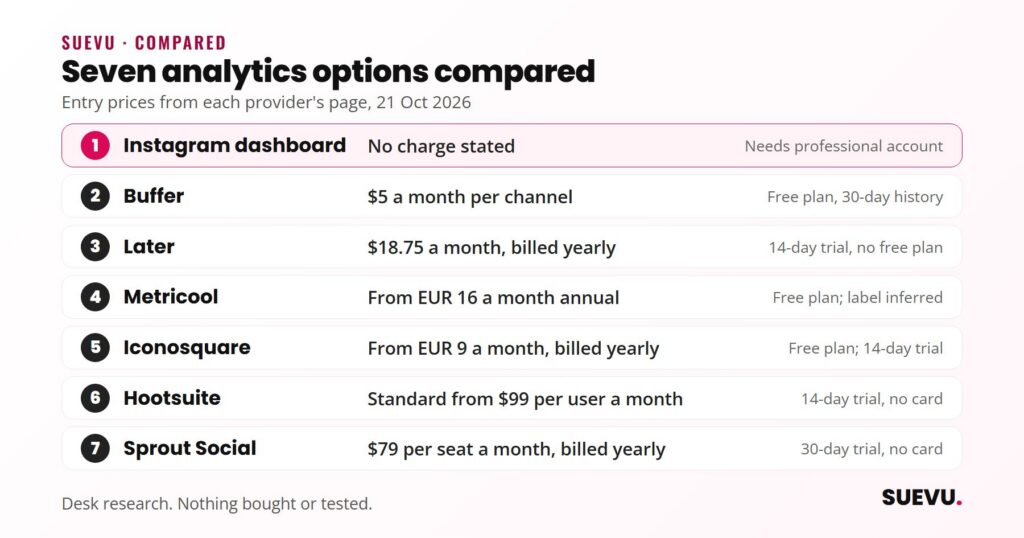
Prices are as shown on each provider’s pricing page on 21 October 2026. Where a page did not label billing terms, the table says so.
| Tool | Best for | Entry price shown | Free plan or trial |
|---|---|---|---|
| Instagram dashboard | First look at performance | No charge stated | Included with the app |
| Meta Business Suite | Facebook and Instagram together | Not stated on the page | Not stated |
| Buffer | Light analytics with scheduling | $5 a month per channel (Essentials) | Free plan, 30-day insights history; 14-day trial |
| Later | Analytics bundled with planning | $18.75 a month, billed yearly | 14-day trial, no free plan listed |
| Metricool | Brands and agencies, many profiles | From EUR 16 a month annual, EUR 20 monthly (labels inferred) | Free plan, 30 days of analytics |
| Iconosquare | Instagram-focused reporting | From EUR 9 a month, billed yearly | Free plan; 14-day trial, no card |
| Hootsuite | Teams | Standard from $99 per user a month | 14-day trial, no card |
| Sprout Social | Larger teams | Essentials $79 per seat a month, billed yearly | 30-day trial, no card |
Instagram’s own analytics
- What it is: the professional dashboard in the Instagram app and on instagram.com. Instagram’s help page says it shows reach, engagement and audience demographics, with a summary of the last 30 days and a “See all insights” option for more detail.
- Who can use it: the help page says to switch to a professional (business or creator) account to access the professional dashboard, and that the account must be public.
- Limits: no competitor tracking, and the features vary with account type, region and eligibility, according to the same page. Meta’s developer documentation adds that some metrics are not available on accounts with fewer than 100 followers.
- Price: the help page mentions no charge.
The old article’s step-by-step instructions (three lines icon, then Insights) are out of date because Instagram has since moved these tools into the dashboard, so we removed them.
Third-party analytics tools
Metricool
- Free plan: 1 brand, 20 scheduled posts a month, 5 competitor profiles and 30 days of analytics history.
- Paid: Starter from EUR 16 a month on the annual rate or EUR 20 monthly (the page does not label which block is which, so this is our reading). It lists up to 10 brands, up to 100 competitors, unlimited history subject to fair use, and PDF or PPT reports. Advanced is from EUR 43 annual or EUR 54 monthly, with up to 50 brands, approval workflows and API access.
- Not confirmed: the Instagram-specific section of the page was cut off in our read, so we cannot say which plan includes Reels and Stories analytics. No trial is mentioned.
Read our full Metricool review for pricing, limits and how it connects to Instagram.
Iconosquare
- Plans (EUR): Free (2 profiles, 1 month of analytics history), Starter from 9 a month, Launch from 33, Scale from 69 and Custom from 116, all billed yearly.
- Features listed: competitor analysis (5 per profile), hashtag tracking, custom feeds and industry benchmarking, with custom dashboards from Starter and automated reports from Launch.
- Trial: 14 days with no card, covering all features, after which the account moves to the Free plan unless you subscribe.
- Caveat: the page lists Starter as 3 profiles for 9 and 5 profiles for 15, while the FAQ says it starts at 3, so confirm the profile count at checkout. The page also does not make clear which plan includes benchmarks.
Buffer and Later
Both are mainly schedulers, with analytics as part of the package. Buffer’s free plan shows insights with a 30-day history, and paid plans add unlimited history and reports. Later lists platform analytics for up to 3 months on Starter, 1 year on Growth and 2 years on Scale. If you also want to plan posts, compare them in Instagram manager tools and our scheduling guide.
Sprout Social and Hootsuite
Both are all-in-one management suites priced per user, aimed at teams rather than solo creators.
- Sprout Social: Essentials $79 per seat a month billed annually or $99 billed monthly, Standard $199, Professional $299 and Advanced $399 (the page did not label the billing term for the last three). Essentials includes 5 social profiles. It offers a 30-day trial with no card. Competitor, tag and paid insights are listed for Professional, and a Premium Analytics add-on for Standard and above.
- Hootsuite: Standard from $99, Professional from $199 and Advanced up to $399 per user a month on annual billing, with Enterprise on request. Standard allows up to 10 social accounts. The 14-day trial needs no card and has daily posting limits. Standard lists analytics and benchmarking against up to five competitors.
Neither page described Instagram-specific analytics in the text we read, so check what each shows for Instagram before paying.
Tools that changed or could not be confirmed
- Quintly: the 2019 article recommended it at “$300 a month”. Quintly’s home page now carries an announcement that quintly “officially becomes Facelift Data Studio”. We could not read a pricing page, so no current price is given.
- Union Metrics: the site did not give us readable content, and a search did not confirm its current status. We have dropped it rather than repeat old plans.
- Old prices: the 2019 article’s prices for Sprout Social, Iconosquare and Union Metrics are all out of date and have been replaced or removed.
Safety and data access
Analytics tools are the lowest-risk category on this site because they read data rather than act on your account. Meta’s documentation says apps can request insights for professional accounts through the Instagram Platform insights API, with permissions you grant on Instagram or Facebook’s own login screen. Meta also states that user metrics are stored for up to 90 days, which is one reason third-party tools keep their own history. If you are closing an account, download what you need first; our guide to deleting your Instagram account explains Instagram’s export step.
Check three things before connecting:
- Does it connect through Instagram or Facebook login? Be wary of any tool that asks for your Instagram password.
- Is it analytics only? Tools that also automate likes or follows are in a different, riskier category. Compare them in our Analytics & Trackers pages and the Automation & Bots group.
- How long is your history kept on the plan you choose?
How to choose
- Just starting: use Instagram’s dashboard for a month before paying for anything.
- Posting and tracking in one place: Buffer or Later.
- Competitors and reports on a budget: Metricool or Iconosquare.
- Teams and clients: Sprout Social or Hootsuite, after comparing seat prices.
For the full toolbox, see Instagram tools by category.
FAQ
What is the best Instagram analytics software?
It depends on your needs. We have not tested any of them, so we do not name a winner. For basics, Instagram’s free dashboard is enough. For history and competitors, compare Metricool, Iconosquare and Buffer.
Is Instagram Insights free?
Instagram’s help page describes the dashboard without any charge. You need a professional account.
Do I need a business account for analytics?
Instagram’s help page says to switch to a professional (business or creator) account for the professional dashboard. Meta’s API documentation says personal accounts are not supported for insights.
How far back does the data go?
Instagram’s dashboard summarises the last 30 days, with more detail available. Meta’s API stores user metrics for up to 90 days. Third-party plans differ: Buffer’s free plan shows 30 days, Iconosquare’s free plan one month, Later up to 3 months to 2 years depending on plan.
Are third-party analytics tools safe for my account?
Analytics tools that use Meta’s official login only read data you permit. Avoid any that ask for your password, and be aware that Instagram says apps generating fake activity break its rules.
Further reading
Pricing and features were read on 21 October 2026 from each provider’s own pages. SUEVU has not bought, signed up for or tested any tool here.