
 Erica
Instagram manager tools cover two different jobs: planning and publishing content, and growing an account. This roundup compares four tools whose own pages we opened on 21 October 2026, and explains why a fifth from the old version of this page was dropped.
We do desk research only. We did not buy, sign up for or run any of these tools, and we link only to Upleap’s homepage, not to the other providers’ sites. Features, limits and prices below are what each provider’s own pages stated on 21 October 2026. Prices change, so check before you rely on one.
Quick answer: For scheduling and inbox work, Later, Buffer and Sprout Social are the three planning tools we checked, from a free plan with limits (Buffer) to team pricing (Sprout Social). Upleap is a different kind of tool: a growth service that automates interactions, which carries account risk.
Status: all four had live pages on 21 October 2026. Price from: free (Buffer, up to 3 channels); Later from $18.75 a month on annual billing. Safety: scheduling tools differ from automation tools; read the safety section.
What an Instagram manager tool is
The label is used loosely. Some tools plan and publish posts, manage comments and messages, and report on performance. Others, such as growth services, interact with other accounts on your behalf to try to attract followers. The two groups have very different risk profiles, so this page keeps them apart.
How we chose
The old version of this page was written in 2019 and listed Upleap, KENJI, Later and Bio.fm. We re-opened the providers’ own pages. Only tools whose pages loaded and showed a current offer are included, and we added two scheduling tools whose pages we also read. We make no claim about which is best; we list what each page says.
Later
- What it is: a social media scheduling and management product.
- Instagram features (pricing page, 21 October 2026): auto publish for Instagram business and creator accounts, plus a notification publishing option that sends a push alert so you post manually and add music or stickers. A social inbox is listed from the Growth plan.
- Limits: the Starter plan allows 30 scheduled posts per profile per month, with analytics going back 3 months.
- Price: Starter $18.75 a month, Growth $37.50, Scale $82.50, all billed yearly, with a 14-day free trial. The page shows these as discounted from a higher list price; we did not find a permanent free plan, although the old version of this page said there was one.
Buffer
- What it is: a scheduling and publishing tool that charges per connected channel. Instagram is one of the supported channels.
- Free plan (pricing page, 21 October 2026): up to 3 channels and 10 scheduled posts per channel.
- Paid plans: Essentials at $5 a month per channel and Team at $10 a month per channel, each with a 14-day trial. The page showed a yearly price of $60 and $120 for one channel, which is “2 months free”.
- Other features listed: a community inbox, hashtag manager, first comment scheduling and a custom link-in-bio page called Start Page.
Sprout Social
- What it is: a team-oriented social media suite.
- Instagram-relevant features (pricing page, 21 October 2026): a consolidated inbox, message tagging, review management and reporting.
- Price: Essentials $79 per seat per month on annual billing ($99 monthly), Standard $199, Professional $299 and Advanced $399 per seat per month, plus an enterprise plan with custom pricing. A 30-day free trial is offered.
- Catch: prices are per seat, so cost grows with team size.
Upleap
- What it is: a growth service. Its own page says it interacts with targeted Instagram users on your behalf, and that it offers no bots or fake accounts. We cannot verify those claims.
- Features listed on its pricing page: follow/unfollow automation, hashtag and account targeting, welcome DM automation, multi-proxy login support and a growth pods network.
- Follower estimates: the page estimates 600 to 800+ followers a month on its entry plan. This is the provider’s figure; we have no independent data.
- Price: Basic $19 a month on annual billing ($229 a year) or $39 monthly, Standard $34 or $69, Pro $64 or $119, with a 7-day free trial. The old page said three days.
- More: our Upleap review has more detail.
Tools we dropped
- KENJI: its site loads and lists monthly plans, a 3-day free trial and terms that ask for your Instagram username and password (read 21 October 2026). It is an engagement bot, not a scheduler, so it is covered in our social media automation roundup instead of here.
- Bio.fm: we did not open its page, so the old pricing and features are not repeated. Our link in bio guide and Linktree review cover link pages instead.
Pricing at a glance
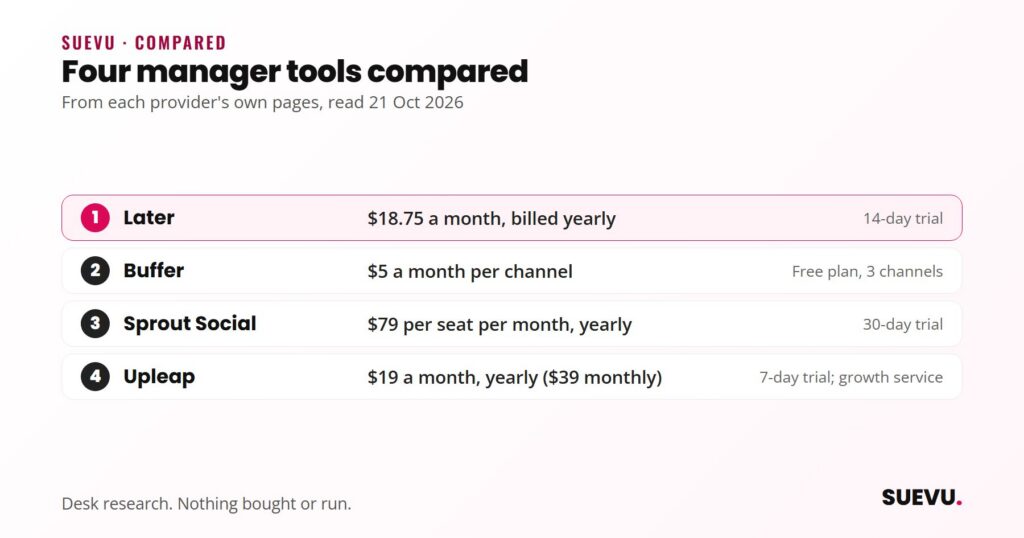
| Tool | Type | Starting price (provider’s page, 21 Oct 2026) | Free option |
|---|---|---|---|
| Later | Scheduling | $18.75 a month, billed yearly | 14-day trial |
| Buffer | Scheduling | $5 a month per channel | Free plan, 3 channels |
| Sprout Social | Team suite | $79 per seat per month, billed yearly | 30-day trial |
| Upleap | Growth automation | $19 a month, billed yearly ($39 monthly) | 7-day trial |
Safety and risks
The scheduling tools and the growth service carry different risks. Instagram’s Terms of Use say you cannot access or collect information “in an automated way without our express permission”. In 2018 Instagram announced that third-party apps generating inauthentic likes, follows and comments violate its Community Guidelines, and said that accounts which keep using them may see their experience affected.
- Scheduling and inbox tools: these publish or reply through your own connected account. We did not verify how each connects to Instagram, so check the provider’s help pages and read the permissions Instagram shows you.
- Growth services such as Upleap: they automate follows and other actions. Instagram’s rules treat automated access without permission as a violation, and possible outcomes include action blocks or restrictions. Do not run two such tools on one account.
- Passwords: never share your Instagram password with a tool whose page does not explain how it connects.
Pros and cons
- Later: pro, auto publish and a notification option for Instagram; con, no permanent free plan found, and a monthly post cap per profile.
- Buffer: pro, a free plan and per-channel pricing; con, the free plan allows only 10 scheduled posts per channel.
- Sprout Social: pro, a full inbox and reporting for teams; con, the highest price per seat.
- Upleap: pro, a hands-off approach with a free trial; con, it automates actions, which Instagram’s rules restrict, and its follower estimates are unverified.
Who suits what
- Solo creators on a budget: a free or low-cost scheduler is the practical start.
- Small businesses: a scheduler with an inbox saves time; compare plan caps before paying.
- Agencies and larger teams: per-seat suites such as Sprout Social are built for shared workflows.
- Anyone considering a growth service: weigh the account risk first.
Related reviews
For more options, see our Automation and Bots category and our Instagram business tools roundup.
Another growth service is Kicksta; read our Kicksta review for the details.
For scheduling with a free entry plan, see our Metricool review: the free plan covers one brand and 20 scheduled posts a month, according to its pricing page (read 27 October 2026).
FAQ
Is there a free Instagram manager tool?
Buffer’s pricing page lists a free plan with up to 3 channels and 10 scheduled posts per channel. Later and Sprout Social showed free trials, not free plans, on 21 October 2026.
Can these tools post to Instagram automatically?
Later says auto publish works for Instagram business and creator accounts. For other tools, check the provider’s help pages for supported account types.
Is Upleap safe?
We cannot say. It automates interactions, and Instagram’s terms restrict automated access without permission. Our Upleap review explains more.
Is KENJI a management tool?
Not in the scheduling sense. Its own pages, read on 21 October 2026, describe an Instagram bot that automates follows, likes and comments. We cover it in the social media automation roundup, together with the risks of that category.
Do I need a business account?
Later says auto publish works for business and creator accounts. Instagram’s own business features, such as chat FAQs, are for business and creator accounts too, according to Instagram’s help page.