
 Erica
To save Instagram photos, start with what Instagram itself offers: a private Save button, collections, a setting that keeps your own posts on your phone, and a data export. Instagram does not give you a button to download a photo from someone else’s post to your camera roll, so for that you need a screenshot or a third-party downloader, each with trade-offs.
This guide covers all four routes. We read Instagram’s help pages and each downloader’s own page on 21 October 2026. We did not install or run any app or site, so we describe what the pages state, not how well they work. Several tools from our older list no longer exist, and we say which below.
Quick answer: for your own photos, switch on Save original photos in Instagram. For other people’s posts, use Save and collections if you only need to find them again. A downloader site is the only route to a file, and the ones we read are free, say they never ask for your Instagram password and say they only work on public posts. You still need permission to reuse someone else’s photo.
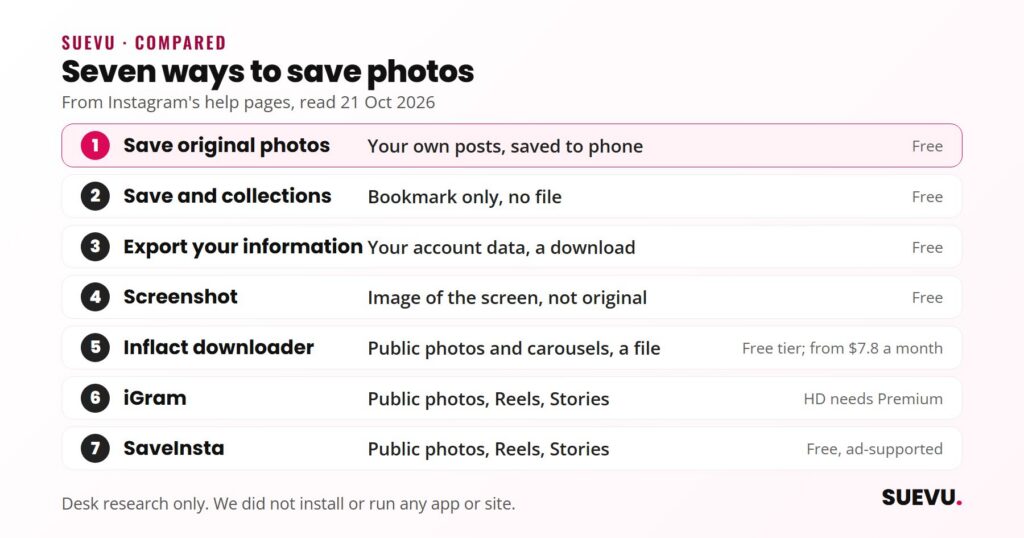
How to save Instagram photos: the options compared
| Option | Saves | Gives you a file? | Cost | Main limit |
|---|---|---|---|---|
| Save original photos (Instagram) | Your own posts | Yes, to your phone | Free | Only photos you post; not available on computers |
| Save and collections (Instagram) | Any post, privately | No, a bookmark | Free | Only you can see it; the post must stay online |
| Export your information (Instagram) | Your account data | Yes, a download | Free | For your own account only |
| Screenshot | Whatever is on screen | An image of the screen | Free | You crop it yourself; not the original file |
| Inflact downloader | Public photos and carousels | Yes | Free tier, paid from $7.8 a month | Free limits are small |
| iGram | Public photos, Reels, Stories | Yes | Free; HD needs Premium | Operator not named |
| SaveInsta | Public photos, Reels, Stories | Yes | Free, ad-supported | Public content only; ads |
How we picked them
We put Instagram’s own features first because they involve no third party. For downloaders, we kept sites that loaded on 21 October 2026, worked without an Instagram login, and stated their limits and rights position on the page. We ruled out any tool whose address no longer resolved or now serves something unrelated.
The criteria were:
- Does it ask for your Instagram password? Any tool that does is out.
- Is it clear about private accounts and rights?
- Is the cost stated? Free tiers with hidden limits count against a tool.
- Does the operator say who it is?
Your own photos: Save original photos
Instagram’s help page “Save Instagram photos to your device” says you can automatically save photos you filter and edit on Instagram to your phone’s library by switching on the Save original photos toggle in settings. Once it is on, every photo you post is saved to your device, and Android users may see a short delay. The page says the feature is not available on computers. You can read the steps in Instagram’s help page. Another app setting that depends on your device is dark mode, covered in our guide to how to make Instagram dark.
This only affects photos you post from now on. It does not retrieve older posts or anyone else’s.
Other people’s posts: Save and collections
Instagram’s help page says you can save a post by tapping the Save icon below a post or Reel. Saved posts are private and visible only to you. Tapping and holding the Save icon lets you add a post to a collection, and collections can also be created from the Saved section.
This is the fastest way to keep a photo for later, such as an infographic or a recipe, and it needs no extra tool. The limit is that you keep a bookmark, not a file. If the owner deletes the post or the account, it goes. The help page notes the feature is not available on computers.
If you want to improve the photos you post yourself, see how to take Instagram photos that earn likes and the Instagram templates guide.
Your whole account: Download your information
Instagram lets you export a copy of your information. According to its help page on exporting, you go to Accounts Center, open Your information and permissions, choose Export your information, create an export and pick Export to device. You can choose which information to include, a date range, a format and the media quality. Once the export is ready you have 4 days to download it.
This is the right route if you want a backup of every photo you have shared. It covers your own account only.
Downloading public Reels
Reels differ from photos. TechCrunch reported in November 2023 that Instagram lets anyone download public Reels worldwide. Reels with licensed music download without sound, the file carries a watermark with the account name, and creators can switch the option off in Settings under Privacy, Reels and Remix. That is a built-in way to save a Reel, but there is no equivalent for photos.
Screenshot
A screenshot works for any post you can see, including private ones you follow. It captures the screen, not the original file, so you get the screen’s resolution and have to crop out the interface. It is fine for a lock screen image or a reference. It does not change who owns the photo or what you may do with it.
Third-party downloaders
Downloader sites take a post link and return the file. The help pages we read describe no such function for other people’s photos, and Instagram’s Terms of Use say you cannot access or collect information in an automated way without its permission. The Terms do not name downloader sites, so we cannot say how Instagram treats any single use. We list the tools below because their pages were open and readable, not as an endorsement.
Inflact Photo Downloader
- Saves: photos and carousels in original quality, without watermarks, per its page
- Login: not needed to download; signing in is for saving to its cloud
- Cost: free tier, Premium listed at $7.8 a month with a $3 week-long trial
- Limits: 2 downloads a day on the free tier (the FAQ says three attempts, so the pages disagree); public content only
- Operator: Wiseway SIA, Riga, Latvia
Inflact says it is not affiliated with Instagram and does not host Instagram content. Its Trustpilot page showed a 4.0 out of 5 score from 656 reviews on 21 October 2026, with the newest review dated August 2026. Complaints included unclear free limits and price; reviewers praised the downloader quality. Trustpilot does not fact-check reviews.
iGram
- Saves: Reels, videos, photos, carousels of up to 20 items, Stories and Highlights
- Login: “Not required”; public accounts only
- Cost: free with no download limit; HD and 4K need Premium
- Operator: not named; the footer shows only “iGram”
iGram says it never asks for your Instagram password and does not store the links you paste or the files you save. Those are its own statements. It also says downloading gives you no rights to the content and that reposting without permission can break copyright law and Instagram’s Terms. Its page links an Android app on a different domain with no stated operator, so we do not cover it.
SaveInsta
- Saves: photos, videos, Reels, Stories and Highlights; carousels not mentioned
- Login: not stated; it says it asks for no information
- Cost: free; the page says there is no paid upgrade
- Catch: ads, and advertising partners may use cookies
SaveInsta says it is independent of Instagram, stores nothing and supports public content only. It names no company or location, and its headline mention of your own account sits oddly beside the private-content exclusion, which the page does not resolve.
For a wider look at viewer and downloader tools, see our guide to Instagram tools.
No longer listed
Updated 21 October 2026. Our 2019 version listed five tools. We removed all five:
- Instasave: its address returned “non-existent domain” on three public resolvers.
- Dinsta: its address still loads, but the site now presents itself as a video games and tech news site.
- DownloadGram: the original address failed to resolve on three resolvers. A site with the same name exists on another address, but we could not confirm it is the same operator, so we do not list it.
- Video Downloader (Android) and Repost for Instagram (iOS): the names are generic and we could not identify the specific apps or confirm they are still available.
Copyright and Instagram’s rules
Saving a photo does not give you the right to use it. Instagram’s Terms of Use say Instagram does not claim ownership of your content and that you cannot do anything that violates someone else’s rights, including copyright. They also say you may use someone else’s works under exceptions or limitations to copyright under applicable law. Those exceptions vary by country, so the safe rule is simple:
- Save for private reference: generally fine in practice, but not something we can call legal advice.
- Repost, edit or use commercially: ask the creator first and credit them.
- Never pass off someone else’s photo as your own.
Frequently asked questions
Can you download Instagram photos without an app?
Yes. A downloader website needs only a post link, and a screenshot needs nothing. Instagram’s own Save button only bookmarks.
Does Instagram notify people when you save their photo?
Instagram’s help page says saved posts are private and visible only to you. For downloader sites, iGram says it does not notify creators; we found no statement for the others.
How do I save photos from a private account?
The downloaders we read support public content only. Use Instagram’s Save button or a screenshot, and ask the owner before sharing.
Is it legal to save someone else’s Instagram photo?
Saving for yourself and republishing are different. The photographer owns the work, and Instagram’s Terms bar violating others’ rights. We cannot give legal advice.
How do I save all my own Instagram photos?
Use Export your information from Accounts Center and choose Export to device. You have 4 days to download the file once it is ready.
Why did my downloader stop working?
Third-party sites depend on Instagram’s page structure and can break or disappear, as the five tools in our old list show.