
 Karen Nguyen
Instagram tools fall into a handful of groups, and picking the right one matters more than picking the most popular name. This guide to Instagram tools sorts them by job, explains what each type can and cannot do, and points you to the best SUEVU review or roundup in every category.
It replaces an older list of “business tools” that mixed scheduling apps, a photo editor and a growth service under star ratings. We rebuilt it as a map of the whole site. Prices and features quoted here were read from each provider’s own page on 21 October 2026 and can change.
Quick answer: start with the job, not the tool. To plan posts, use a scheduler such as Later or Meta Business Suite. To share more than one link, use a link-in-bio page. To grow an audience, expect to work on content first, and treat any growth service or automation bot as a risk to your account, because Instagram says such apps break its rules.
The categories at a glance
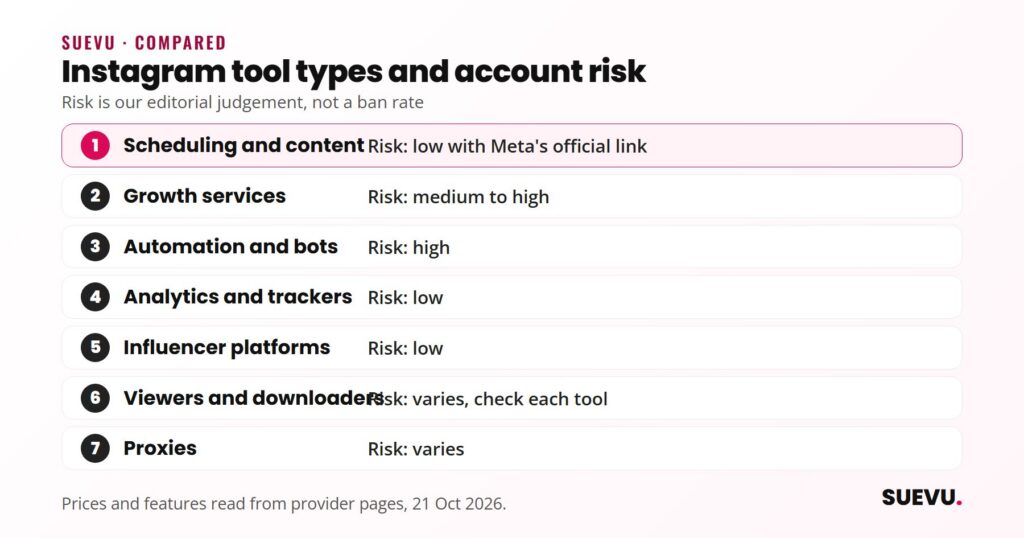
Instagram launched in 2010 and is owned by Meta, according to Wikipedia’s Instagram entry. Around the app has grown an ecosystem of third-party software. The table shows the groups we cover, what they are for, how risky they are for your account, and where to read more.
| Category | What it does | Account risk | Start here |
|---|---|---|---|
| Scheduling and content | Plans, designs and publishes posts | Low when it uses Meta’s official connection | Content & Scheduling |
| Growth services | Delivers or builds followers for a fee | Medium to high | Growth Services |
| Automation and bots | Likes, follows and comments for you | High | Automation & Bots |
| Analytics and trackers | Measures reach, engagement and growth | Low | Analytics & Trackers |
| Influencer platforms | Matches brands with creators | Low | Influencer Platforms |
| Viewers and downloaders | Saves or views public content | Varies, check each tool | Viewers & Downloaders |
| Proxies | Routes traffic through other IP addresses | Varies | Proxies |
The risk column is our editorial judgement, based on whether a tool needs your login or acts on your behalf. It is not a measured ban rate, and nobody publishes one.
Scheduling and content tools
This is the safest and most useful place to start. A scheduler lets you plan a month of posts in one sitting and publish them at set times. Our guide covers how often to post, and the Content & Scheduling category lists more tools.
Later
- What it does: schedules and auto-publishes to Instagram business and creator accounts, with a visual calendar, hashtag suggestions and a Best Time to Post feature
- Also on the site: Link in Bio, analytics, a social inbox for comments and messages, approvals and AI caption tools
- Price: according to Later’s pricing page, plans run from $18.75 a month (Starter, billed yearly) to $82.50 (Scale, billed yearly), each with a 14-day free trial. No free plan was listed on 21 October 2026
- Limit: the Starter plan caps Instagram scheduling at 30 posts per profile per month
Meta Business Suite
Meta’s own Meta Business Suite page says you can plan posts, stories and ads ahead of time, reply to messages and view insights for Facebook and Instagram. The page does not state a price, so check before you rely on it. It is the obvious first thing to try before paying a third party.
For method rather than product, read our step-by-step guide to scheduling Instagram posts.
Templates and video are covered in 4 tools to create Instagram templates and video makers for Instagram.
Link-in-bio tools
Instagram gives you one clickable link in your bio. A link-in-bio page turns that into a short menu of links. Linktree is the best-known example. According to its own site, the Free plan includes unlimited links, standard styling options and basic analytics, and paid Starter, Pro and Premium plans exist. Linktree’s prices vary by region and the page shows no US dollar figures, so we do not quote any. We cover its strengths and alternatives in our Linktree review, and the wider topic in Instagram link in bio.
The trade-off is an extra click between your profile and your destination. Use one only if you genuinely have several things to point to. Later also bundles a link-in-bio page with its scheduler.
Growth services
Growth services promise more followers. Some deliver followers from a network, some run targeted engagement for you. Be sceptical of any promise of a fixed result. Our Growth Services category collects the reviews.
Upleap
- What it says it does: follow and unfollow automation, hashtag and account targeting, weekly audits and welcome DMs. It describes the people it engages with as real accounts matching your audience
- Price: Upleap’s page lists Basic at $19 a month, Standard at $34 and Pro at $64, and says annual billing is discounted. A 7-day free trial is offered on every plan
- Caution: the growth figures on the page are estimates, and the page gives no data or independent verification for its “real” and “organic” claims. It also does not say how you log in
- Read the details in our Upleap review.
- For a full-service alternative see Nitreo, covered in our Nitreo review.
- For the most-asked question of all, see our roundup of free Instagram followers services.
- The best overall comparison on the site is leading Instagram growth services.
- Top Instagram followers apps and where people buy followers cover the rest.
Automation and bots
Bots like, follow, comment and send messages for you. They are the riskiest category and the one where tools disappear most often. Combin, for example, once sat in this group: as of 21 October 2026 its website redirects to an unrelated site, which we explain in our Combin review. The Automation & Bots category lists the rest.
- If you want to understand the category before touching it, read Instagram automation: ways to grow and the best social media automation tools.
- For hands-on management software compare Instagram manager tools, and for message handling see Instagram DM tips and tools.
- Several former bots have closed, and our Social Envy and Social Drift pages list what people moved to.
Analytics and trackers
Analytics tools tell you which posts work, when your followers are online and how reach changes. They read data and do not act on your account, which makes them low risk. Meta Business Suite says it provides insights across Facebook and Instagram, and third-party tools usually add history, benchmarking and reports. Our roundup of Instagram analytics tools compares the options.
Our guide to the Instagram algorithm explains which numbers matter, and the Analytics & Trackers category has the reviews.
Influencer platforms
These marketplaces connect brands with creators, or help creators find sponsors. Browse the Influencer Platforms category, or start with tools that help you find Instagram influencers.
Then look at influencer marketing platforms. For a single platform, see our Moonio review. If you are the creator, how to get sponsors on Instagram is the better read.
Viewers and downloaders
Viewers let you look at public profiles without an account, and downloaders save photos and video. Check the rights to any content you reuse: saving a picture does not give you permission to repost it. Our guide to saving Instagram photos lists five apps and the Viewers & Downloaders category gathers more.
Proxies
A proxy routes your connection through another IP address. People who manage many accounts use them, and so do automation users. They do nothing for growth on their own. The Proxies category holds our provider reviews, including Oxylabs. Several proxy brands have been renamed or closed, so check a provider’s current status before paying anyone.
Safety: what Instagram allows
Instagram has said that third-party apps which generate fake likes, follows and comments break its Community Guidelines and Terms of Use, and that accounts continuing to use them “may see their Instagram experience impacted”. The same post warns that sharing your password with such apps makes your account less secure.
Meta supports a different model for software that works with Instagram: the Instagram Platform provides APIs for professional accounts, including publishing. As a rule of thumb, tools that connect this way (most schedulers) carry less risk than tools that ask for your password and act as you.
- Never give your Instagram password to a tool you cannot verify.
- Turn on two-factor authentication.
- Be wary of guaranteed results and unexplained “real follower” claims.
- Check that a tool still exists before you pay: our reviews note when a site redirects or has closed.
How to choose
- Name the job. “More followers” is a result. “Post three times a week without opening the app each time” is a job a scheduler can do.
- Try the native route first. Look at the insights Meta Business Suite offers before paying a third party.
- Read the pricing page, then the cancellation terms. Free trials often convert to paid plans.
- Prefer tools that do not need your password.
- Work on content in parallel. Our guides on engagement and building a following sit in the Guides section.
All our curated lists are collected under Best Of. How we judge tools is explained on the How We Review page.
FAQ
What are the best Instagram tools for business?
It depends on the job. For planning posts, a scheduler such as Later or Meta Business Suite. For links, a link-in-bio page. For measurement, Meta Business Suite insights or an analytics tool. We do not rank growth bots as “best” because of the account risk.
Are Instagram tools safe to use?
Schedulers and analytics tools that connect through Meta’s official integration are generally lower risk. Tools that act on your behalf or ask for your password carry more, and Instagram says apps that create fake engagement break its rules.
Are there free Instagram tools?
Yes. Linktree lists a Free plan with unlimited links. Later lists a 14-day free trial rather than a free plan, and Meta Business Suite’s page does not state a price.
Do I need a business account for these tools?
Often, yes. Meta’s Instagram Platform supports professional (business and creator) accounts, and Later says its auto-publishing works with business or creator accounts.
Do growth services work?
Providers advertise results, but the figures on their pages are estimates without independent verification. Followers gained this way may not engage, and the method may violate Instagram’s terms. See our growth services roundup for the trade-offs.
Why did the old list of six tools disappear?
It was written in 2020, included star ratings we could not support, and several of its entries have changed since. Where we could not confirm a claim from the provider’s current page, we removed it.
Further reading
- Instagram: Reducing Inauthentic Activity on Instagram (November 2018)
- Meta for Developers: Instagram Platform overview
- Meta Business Suite
- Wikipedia: Instagram
Prices and features were read from each provider’s own page on 21 October 2026. If something is out of date, tell us on the contact page and we will correct it, as described in our editorial policy.