
 Erica
The best video makers for Instagram are not the same tools they were in 2020. Several of the apps people use for Reels now come from Instagram itself, and the old list of paid template sites needed a full recheck. This guide compares eight video makers and editors, using what each provider’s own pages say as of 21 October 2026. It sits alongside our Instagram tools roundup.
We did desk research only. We did not sign up for, pay for or run any of these tools, so nothing here is a hands-on test. Every price, plan and limit comes from a page we opened on 21 October 2026, and anything we could not confirm is marked as unconfirmed.
Quick answer: start with Edits, Instagram’s own app, which its launch post describes as free to download with watermark-free export. For a free editor with templates and no Instagram tie-in, look at VN or CapCut. For designs, branded clips and social graphics, Canva has a video editor and publishes straight to Instagram. We removed one tool from the old list because we could not confirm it is still operating.
The video makers for Instagram, compared
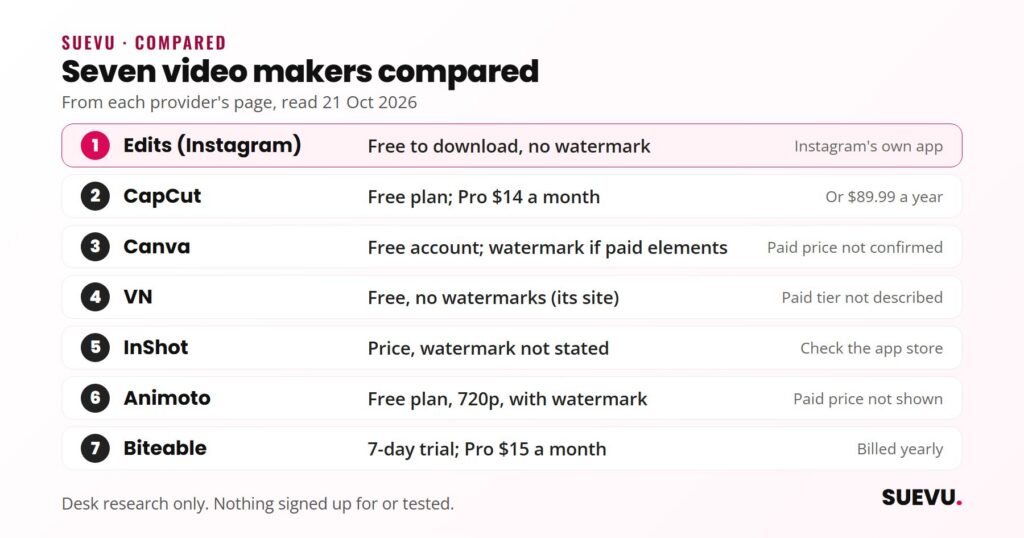
Prices are in US dollars as shown on each provider’s page on 21 October 2026. “Not stated” means the page we opened did not say.
| Tool | Type | Free option | Watermark | Paid price shown |
|---|---|---|---|---|
| Edits (Instagram) | Phone app | Free to download | None on export | None stated |
| CapCut | App and browser editor | Free plan | Site says none online | Pro $14 a month or $89.99 a year |
| Canva | Browser and app | Free account | Only with paid elements on Free | Not confirmed |
| VN | Phone and desktop app | Free | None, per its site | Not stated |
| InShot | Phone app | Not stated | Not stated | Not stated |
| Animoto | Browser | Free plan, 720p | Yes on Free | Not shown on the page we read |
| Biteable | Browser | 7-day trial | Not stated | Pro $15 a month billed yearly, $29 monthly |
| Bannersnack | Browser | Free sign-up | Not stated | Not shown |
How we picked these tools
We started with the five tools in our 2020 list, then searched for what current Instagram Reels editing guides cover. The 2026 lists we saw kept returning to CapCut, Instagram’s Edits app, InShot and VN, so we added them, plus Canva because its video editor now supports Reels templates. We judged each on four things:
- Still operating. The site must load and show a current product.
- Cost to get a clean video. A free tool that stamps its logo on the export is a different offer from one that does not.
- Fit for Instagram. Vertical templates, captions, or a direct publish route.
- Honesty of the page. Where a price or limit is not stated, we say so instead of guessing.
The way we assess tools is explained on our How We Review page. Another big step in a video workflow is the cover and graphics, which we cover in 4 tools to create Instagram templates.
Edits and the Instagram Reels editor
Edits: Instagram’s own video app
- Status: active. Launched 22 April 2025 for iOS and Android
- Price: Instagram’s launch post says it is free to download and available globally
- Watermark: Instagram’s page describes high-quality exports with no watermark
- Sign-in: with your Instagram account
- Best for: people who want to edit and publish without leaving Instagram’s ecosystem
According to Instagram’s launch post, Edits has a frame-accurate timeline, a camera, cutouts and AI-powered animation, an inspiration feed of reels with trending audio, project and idea tracking, and performance insights. The Edits site also lists green screen, captions, advanced audio tools, keyframes, a teleprompter and templates as tutorial topics.
The launch post named keyframes, AI-based “Modify”, collaboration and more fonts, transitions and royalty-free music as coming soon. We did not check which have shipped, so confirm in the app. Neither page states export limits or a recording length. Once a video is ready, see how to schedule Instagram posts.
The editor inside Instagram
You do not need a separate app for simple cuts. Instagram’s Reels page lists multi-clip editing with trimming, speed, align, a timer, text, effects, stickers, voiceover, a music library and cover photo selection. Drafts are saved on your device and cannot be opened on another one.
The same page gives two different lengths: multi-clip videos up to 3 minutes in the overview, and recording and editing up to 20 minutes in its help section. It also says reels over 3 minutes will not be recommended to new audiences. Plan around the 3-minute figure. Our guide to the Instagram algorithm explains more about how posts are shown.
CapCut
- Status: active (site live 21 October 2026)
- Price: according to its pricing page, Free is $0 with basic editing tools and free templates. Pro is $14 a month, or $89.99 a year, and adds premium templates and monthly AI credits. The page says displayed prices are for reference only and final prices show after sign-in
- Watermark: the homepage describes its free online editor as exporting HD video without a watermark for Reels
- Best for: quick social edits with captions and AI tools
CapCut’s pricing page also lists Ultra and Teams plans. Its tools include auto captions, a background remover and a long-video-to-shorts feature. Pro’s AI generation allowances are metered in credits, so check what your plan includes before relying on them. Availability of apps can differ by country. Our guide to Instagram captions covers the written side.
Canva
- Status: active
- Price: Canva’s pricing page loaded without readable plan prices when we opened it, so we do not quote any. Its video editor page says a free account is available
- Watermark: per Canva’s video editor FAQ, free accounts export without a watermark if you only use free elements. Watermarks appear when a Free account uses Pro or paid elements. Pro videos have none
- Best for: branded clips, Reels templates and one design workflow for graphics and video
The editor page describes a multi-layer timeline, one-click captions, background removal, trimming and layering, resizing for different feeds, and a Magic Video feature that builds clips from a prompt. Reels templates are listed. Several features carry a Pro label, and the FAQ says you can publish directly to social platforms including Instagram from the Share menu. Our Instagram slideshow guide covers image-led formats.
Our 2020 list praised a Canva animation tool that turns designs into movies. That product has since changed, so we describe only what the current page lists.
VN
- Status: active
- Price: its homepage says “no watermarks, all for free”. A paid tier is not described on that page
- Features: multi-track timeline, keyframes, speed curves, auto captions, cutout, collage and 150+ free templates
- Best for: free, watermark-free editing with more control than a basic phone editor
VN’s own page claims 700M+ downloads. We could not verify that figure independently, so treat it as the provider’s claim. Check the app store listing for in-app purchases before you install.
InShot
- Status: active (site live)
- Price and watermark: not stated on the page we read, so we cannot say either
- Features: auto captions, AI cut, video stabiliser, auto beat, cutout, speed curves, tracking, transitions, effects and a music library
- Best for: beginners who want a familiar phone editor
InShot is mentioned in many Reels lists, but its own homepage sends you to the app stores for details. Check the store listing for the free version, subscriptions and any watermark before you rely on it.
Animoto
- Status: active. Its site says Animoto is part of the Redbrick family of brands
- Free plan: 720p video, unlimited video creation and 50 licensed music tracks, with an Animoto watermark
- Basic plan: removes the watermark and gives unlimited downloads at 1080p
- Professional: adds logo and colours, 4K, 3,000 licensed tracks and a Getty Images library
- Pro Plus: three users and team features, including time-stamped comments
- Price: not shown in the text of the pricing page we read
This is the closest match to the old list. The plan names and limits above replace the 2020 tiers and prices, which no longer match. Animoto suits slideshow-style business videos more than fast trend edits.
Biteable
- Status: active
- Trial: 7 days, no credit card needed, per its pricing page
- Pro: $15 a month billed yearly ($180 a year), or $29 billed monthly. One user, unlimited HD exports, 20 AI avatar clips, videos up to 10 minutes
- Premium: $49 a month billed yearly ($588 a year), or $99 billed monthly. Three users, unlimited 4K exports, captions, videos up to 20 minutes
- Business: custom pricing
The old Starter, Pro and Unlimited plans with video caps are gone. The pricing page now lists no free plan, only the trial. The tool is built around templates and stock footage, which makes it a fit for explainers and announcements.
Bannersnack
- Status: active (footer shows 2026)
- What it is: a browser editor mainly for static and animated banners and ads, with templates and PSD import
- Export: MP4, GIF and HTML5. Its FAQ says animated HTML5, GIF and MP4 export needs the Pro plan or higher
- Price: plan names are Pro, Plus and Team. Prices were not readable on the page, so we quote none
It is a design tool first. Use it for short animated posts and ads, not for editing filmed footage.
No longer listed
We removed Shakr from this list on 21 October 2026. Its website blocked our automated access with a security page, so we could not confirm what the company offers today, and its old pricing could not be checked. Our 2020 text quoted plans we cannot verify, so we dropped them. If you plan to use Shakr, check its current site yourself.
Why video matters on Instagram
Instagram’s Reels feature was announced in 2019 and has grown from 15-second clips to longer formats, according to Wikipedia’s Instagram entry, which dates the three-minute limit to a January 2025 announcement. A better editor does not guarantee reach, but a clean, captioned vertical video is the starting point. To understand how posts get shown, see the algorithm guide linked earlier and our tips on increasing engagement.
Video is also where captions earn their place, and image-led formats such as slideshows are covered in the guides linked above.
Safety and what to watch for
- Passwords: a video editor does not need your Instagram password. Edits signs in with your Instagram account, which Instagram runs. Be wary of any other tool that asks for your login.
- Free means conditions. Canva’s free export depends on using only free elements, and Animoto’s free plan adds a watermark.
- Music rights: a tool’s licensed tracks may not cover every use. Read the terms of any library before using audio in business content.
- Trials convert. Biteable’s trial needs no card per its page, but check cancellation terms on any plan you start.
- Prices change. Several tools here showed price details that differ from what we found in 2020.
How to choose
- Try the free native route first: Instagram’s Reels editor or Edits.
- Need captions or templates fast: CapCut, VN or Canva.
- Making business videos from stock footage: Biteable or Animoto.
- Making animated ads: Bannersnack.
- Plan the rest of the workflow. Scheduling matters once you have videos; see the scheduling guide linked above. More tools are gathered in the Content & Scheduling section.
FAQ
What is the best free video maker for Instagram?
Edits is free to download per Instagram, and VN says its editor is free with no watermarks. CapCut and Canva also have free plans with limits described above. Which is best depends on whether you need templates, captions or a timeline.
Does Instagram have its own video editor?
Yes. The Reels editor inside Instagram handles trimming, speed, text, music and voiceover, and Edits is a separate free app launched in April 2025 for fuller editing.
How long can an Instagram Reel be?
Instagram’s Reels page says up to 3 minutes for multi-clip videos, and its help text mentions up to 20 minutes for recording and editing. Reels over 3 minutes are not recommended to new audiences.
Will free video apps put a watermark on my Reel?
It varies. Edits and VN say no. Canva depends on the elements you use. Animoto’s free plan has one. For InShot we could not confirm from its own page.
Why were Shakr and the old pricing removed?
We could not verify Shakr’s current status, and the 2020 prices for the other tools no longer matched the providers’ pages, so we replaced them.
Do I need a business account to use these?
These pages do not say so. Most editors export a file you upload yourself. Direct publishing, such as Canva’s Share menu, may have its own account requirements.
Further reading
Prices and features were read from each provider’s own page on 21 October 2026. If something is out of date, tell us on the contact page and we will correct it, as described in our editorial policy.