
 Grace Sullivan
This ManyChat review covers one of the best-known tools for automating Instagram DMs: replying to comments with a message, answering keywords, welcoming new followers and passing leads to other channels. It sets out what ManyChat’s own pricing page and help center say as of 3 November 2026, how the tool connects to Instagram, what Meta’s messaging rules allow, and what users report.
We do desk research only. We did not sign up for, pay for or run ManyChat, so everything below comes from ManyChat’s pricing page, its Instagram product page and help center, Meta’s developer documentation and Trustpilot, all read on 3 November 2026.
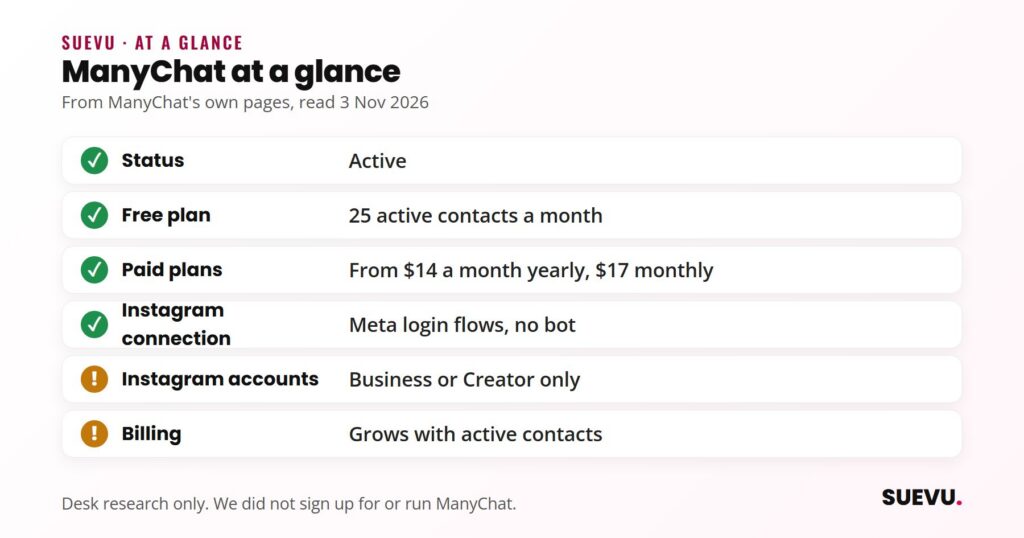
Quick answer: ManyChat is a live DM automation platform for Instagram, TikTok, WhatsApp, Messenger, Telegram, SMS and email. It connects to Instagram through Meta’s own login flows, needs a Business or Creator account and calls itself an Official Meta Business Partner. A Free plan covers 25 active contacts a month; paid plans start at $14 a month billed yearly ($17 monthly) and are priced by “active contacts”, so the bill grows with the number of people you message. User reviews on Trustpilot are poor, mostly about billing and support.
Status: active. Price from: $0 on Free, $14 a month yearly or $17 monthly on Essential. Safety: works inside Meta’s messaging rules rather than as a bot; watch the contact-based billing.
What ManyChat is
ManyChat describes itself as a tool that helps creators and social-first businesses “handle engagement at scale” by replying to comments and messages automatically, capturing leads and driving clicks and sales from conversations. Its pricing page says it is used by more than one million creators, marketers and brands, and calls it the “#1 Instagram automation platform”. Those are the company’s own claims, and we did not verify them.
The supported channels are Instagram, TikTok, WhatsApp, Facebook Messenger, Telegram, SMS and email. Instagram is the channel ManyChat leads with, and it is the focus of this review; our social media automation roundup compares tools across networks. Our Automation & Bots category covers the wider field, including the password-based bots that work very differently.
How it connects to Instagram
ManyChat’s help center says your Instagram account must be a professional account, Business or Creator, and that personal accounts cannot be connected. It offers three ways to connect:
- Via Meta (recommended): needs the Instagram account to be in a Meta Business Portfolio and gives access to the newest features, including Follow to DM and Conversions API tracking.
- Via Instagram: the quickest route, with no Meta Business account needed, but some advanced features and automations may be limited.
- Via Meta Business Suite: needs a Facebook Page linked to the Instagram account and full admin control of that Page. ManyChat suggests it for agencies and for ad features.
In each flow you review and grant permissions in a Meta or Instagram window, and where a password is needed you type it on Instagram’s own login page, not into ManyChat. If you are still setting up a professional profile, Instagram’s help center explains how to set up a professional account; note that a private personal account becomes public when it switches.
What it does on Instagram
ManyChat’s Instagram page lists automatic link sending, replies to comments, replies to DMs and messages to new followers, with templates for giveaways, lead magnets, sales conversations and booking calls. Its automation builder offers step-by-step Quick Automations and a Flow Builder for custom flows, and its FAQ says no coding is needed and AI can help build flows.
- Comment to DM: someone comments a keyword on a post or Reel and gets a DM, often with a link. Our Instagram DM guide explains how DMs work on the Instagram side.
- DM keywords and story replies: automatic answers when a message or story reply matches a trigger.
- Follow to DM (beta): a welcome message to new followers. The help center says it runs once per follower, that Meta allows only one Follow to DM message per person per week, and that if someone follows several accounts using it, only the first one’s message is sent. Eligibility is decided by Meta, reviewed weekly and can be withdrawn. It needs the new “Via Meta” connection.
- Inbox and AI: paid plans add inbox tools, and Pro and above list Manychat AI and AI-powered conversations.
- Other channels: Pro can move leads from Instagram or TikTok into WhatsApp, and connects to email, SMS, CRM and commerce tools.
These features are about turning engagement into conversations and sales, the topic of our guide to turning followers into customers.
Meta’s messaging rules
Instagram DM automation runs inside limits set by Meta, not by ManyChat. Meta’s messaging API documentation says an app can only message a user after that user has messaged the professional account first, and the standard window to reply is 24 hours (up to 7 days after a click-to-message ad). A separate human agent tag gives a 7-day window for delayed replies from a person. Meta also says automated chat experiences must disclose that a person is talking to an automated service where the law requires it.
That is why ManyChat’s flows ask people to tap a button or comment a keyword first: the action opens the window. ManyChat’s Follow to DM article says the tap on its opening message gives permission to keep messaging for 24 hours.
Pricing
Prices below are in US dollars from ManyChat’s pricing page on 3 November 2026. The page says prices exclude tax and are “determined by the user’s billing country”, so the figure you see at checkout may differ. ManyChat’s help center says this pricing model started on 2 March 2026 and is being rolled out country by country to older accounts.
| Plan | Billed monthly | Billed yearly | Active contacts a month | Channels | Users |
|---|---|---|---|---|---|
| Free | $0 | $0 | 25 | 2 | 1 |
| Essential | $17 a month | $14 a month ($168 a year) | 250 | 2 | 2 |
| Pro | $39 a month | $29 a month ($348 a year) | 2,500 | 3 | 3 |
| Business | $99 a month | $69 a month ($828 a year) | 7,500 | Unlimited | 5 |
| Advanced | $199 a month | $139 a month ($1,668 a year) | 25,000 | Unlimited | 10 |
Free has up to 4 live triggers, a basic inbox and ManyChat branding. Essential removes the branding and allows unlimited custom automations. Pro adds broadcasting, AI features and API access; the help center says it includes 2 inbox seats, with extra seats at $25 each. Business and Advanced add a multi-user inbox and priority support. Essential and Pro have a 14-day free trial, and the Free plan needs no card. The FAQ says you can get a refund if you cancel within 30 days of buying a plan, and that annual plans cannot be downgraded or switched to monthly until the year ends.
How active contacts work
An active contact is a person you interact with during a monthly billing period, through automations, AI, broadcasts or the inbox. The number of messages does not matter: one person is one active contact for the month. Annual plans still count contacts each month. If you go over your limit, ManyChat says automations keep running and you pay an overage fee per extra contact; on Pro the help center lists $0.05 per extra contact on monthly billing and $0.038 on annual billing. You can set an overage threshold, ManyChat sends warnings as you approach the limit, and overage is waived if you upgrade within the same billing cycle.
The practical point is that a popular comment-to-DM post can create hundreds of active contacts in a day. Set the overage threshold before you run a giveaway or a “comment LINK” campaign.
Safety and account risk
ManyChat is not a growth bot. It does not follow, like or comment on other accounts; it answers people who contact you first, inside the windows Meta allows. Its Instagram page FAQ asks whether using it will get an account locked and answers “Not at all”, adding that ManyChat “is a Meta official business partner”. We did not verify the partner listing, and no third-party tool can promise that Meta will never restrict an account. The real risks are different from the password-based tools in our guide to Instagram automation.
- Spam signals: heavy automated messaging can still annoy people and draw reports, so keep flows relevant and disclose automation where required.
- Feature changes: beta features such as Follow to DM depend on Meta and can be removed from an account.
- Billing: contact-based pricing is the risk users mention most (see below).
What users say
On Trustpilot, ManyChat has a 2.1 out of 5 TrustScore from 310 reviews (read 3 November 2026). Trustpilot notes the company has not invited customers recently, so the reviews may not be representative, and that it has not replied to negative reviews. Trustpilot’s AI summary of 87 recent reviews says most reviewers were unhappy, citing confusing subscription models, unexpected charges, unhelpful support and automations that stopped working. Recent examples include a reviewer who said “contacts” counted every conversation in their inbox (9 August 2026), one who said the price was hard to predict as their following grew (8 July 2026), and one who said the “Say hi to new followers” automation did not work for them (22 May 2026). The reviews are on Trustpilot.
Creator testimonials on ManyChat’s own Instagram page quote large revenue and reach figures; they are marketing material, and we did not use them for any claim here.
Pros and cons
Pros
- Connects through Meta’s own login flows, with no password handed to ManyChat.
- Comment to DM, keyword replies, story replies and Follow to DM in one builder.
- Free plan with no card, and 14-day trials on Essential and Pro.
- Seven channels, including WhatsApp, TikTok, SMS and email.
- Published prices and a stated 30-day refund window.
Cons
- Business or Creator accounts only.
- Free plan covers 25 active contacts a month and carries ManyChat branding.
- Contact-based billing can rise quickly after a viral post.
- Prices depend on billing country, and older accounts may still be on the previous model.
- Poor Trustpilot rating, with billing and support complaints.
- Annual plans cannot be downgraded mid-term.
Who it suits
ManyChat suits creators, coaches and small brands that get a steady flow of comments and DMs and want to answer them with links, lead forms or sales flows, especially if they also use WhatsApp or TikTok. It is a weaker fit for accounts that only get a few messages a week, which are easy to answer by hand, and for anyone who needs a fixed, predictable bill. If your goal is more engagement in general, start with our guide to increasing Instagram engagement.
Alternatives
If you mainly need scheduling and analytics with some DM automation, Metricool includes its Flows feature in paid plans. Check each tool’s own pages on the day you decide, because DM features depend on Meta and change often.
ManyChat FAQ
Is ManyChat free?
Yes, there is a Free plan at $0 for up to 25 active contacts a month, 2 channels and up to 4 live triggers, with ManyChat branding. It does not need a credit card.
How much does ManyChat cost?
On 3 November 2026 the pricing page listed Essential at $17 a month ($14 billed yearly), Pro at $39 ($29), Business at $99 ($69) and Advanced at $199 ($139), in US dollars before tax. Prices depend on your billing country, and extra contacts cost more.
Is ManyChat safe for my Instagram account?
It connects through Meta’s own login flows and only messages people who contacted you first, which is different from bots that automate follows or likes. ManyChat says it is an Official Meta Business Partner. No tool can guarantee Meta will never restrict an account, so keep messages relevant.
Does ManyChat work with personal Instagram accounts?
No. The help center says the account must be a Business or Creator account.
What is an active contact?
A person you interact with in a monthly billing period, however many messages you exchange. Going over your plan’s limit adds a per-contact fee rather than stopping your automations.
Can I get a refund from ManyChat?
The pricing page FAQ says that if it has been under 30 days since you bought a plan, you can cancel and get a refund by messaging support.