
 Erica
Erica
Instagram automation means using software to do things on Instagram that you would otherwise do by hand, such as posting, following, liking or replying to messages. Some of it is built into Instagram’s official tools and is fine. Some of it breaks Instagram’s rules and can cost you reach or your account.
This guide explains the difference, sorts the common types of automation into safer and riskier groups, and points you to our Automation and Bots reviews. We do desk research only: we did not sign up for, pay for or run any tool mentioned here. Everything below comes from Instagram, Meta and independent reporting, read on 21 October 2026.
Quick answer: scheduling posts and answering messages through Instagram’s approved tools is the low-risk way to automate. Bots that follow, like and comment on your behalf, or that ask for your Instagram password, are the high-risk way: Instagram has said such apps violate its rules. Automate the admin, not the relationships.
Safer: scheduling, analytics, approved messaging. Riskier: follow, like and comment bots, password-based growth services. Nothing here is guaranteed safe.
What Instagram automation is
The term covers a wide range. At one end is a scheduler that publishes a post you wrote at a time you chose. At the other is a bot that follows hundreds of accounts, likes their photos and leaves generic comments in the hope of being followed back. Both are called automation, and Instagram treats them very differently.
A useful test is whether the tool uses a route that Instagram has approved, or whether it simply logs in as you and acts. The first group works with Instagram. The second works around it. Our social media automation roundup compares tools across platforms.
What Instagram’s rules say
On growth bots, Instagram has been direct. In a November 2018 announcement, Instagram said some accounts use third-party apps to artificially grow their audience, that these apps violate its Community Guidelines and Terms of Use, and that it would remove the inauthentic likes, follows and comments they generate. It added that accounts which keep using such apps may see their Instagram experience impacted.
The same announcement warns that sharing your login details with these apps makes your account less secure, and says that changing your password revokes their access. Accounts it identified were sent an in-app message and asked to change their password.
On the approved side, Meta documents an official route. Its Instagram Platform documentation says apps can publish photos, videos, Reels and carousels, manage comments and reply to messages, for Instagram professional accounts only (business or creator accounts). For automated chat, it says that where the law requires it the user must be told they are talking to an automated service, and that a path to a human should be provided.
We could not load Instagram’s full Terms of Use text during this research, so we do not quote its wording here. Read it yourself before choosing a tool.
Safer categories
“Safer” means designed around Instagram’s official tools. It does not mean risk-free, and each tool’s own behaviour still matters.
- Scheduling and publishing. Tools that publish posts you prepared, using Meta’s publishing route for professional accounts. Our scheduling guide and the Content and Scheduling reviews cover this.
- Analytics and reporting. Tools that read your insights to show what works. They do not act on your account. See the Instagram manager tools roundup for options.
- Message handling. Inbox tools and approved auto-replies for professional accounts, with disclosure and a human fallback as Meta describes. See our guide to managing your Instagram DM inbox.
- Comment moderation. Hiding or replying to comments through the official route.
Riskier categories
- Follow and unfollow bots. They follow accounts in bulk and drop them later. This is the core of what Instagress did, as covered in our Instagress alternatives page.
- Auto-like and auto-comment tools. They interact with other people’s posts for you. Generic comments are easy to spot, and the people receiving them can report them.
- Auto-DM to strangers. Unsolicited messages are the most likely to be reported.
- Any service that asks for your Instagram password. Instagram’s own advice is that sharing credentials makes the account less secure. Kicksta‘s FAQ, for example, states that it needs your password and stores it encrypted, as set out in our Kicksta review.
- Buying followers or likes. Not automation as such, but often confused with it and covered by the same rules on inauthentic activity.
Nitreo and Upleap are two paid growth services in this riskier group. Our Nitreo review and Upleap review look at what their own pages state and what they leave unsaid.
Categories side by side
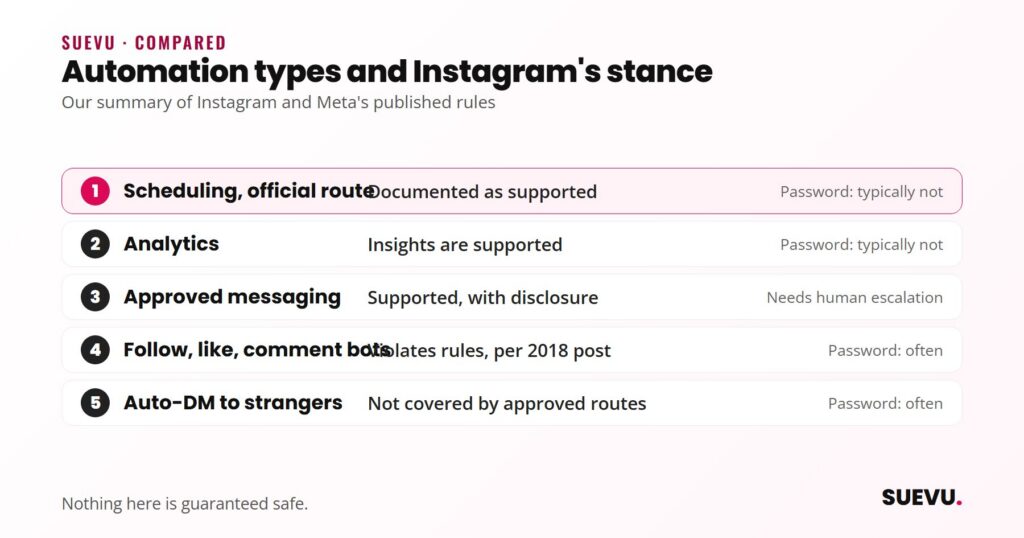
This is our summary of the rules above, not a promise about any particular tool.
| Type | Acts on other people’s accounts | Needs your password | Instagram’s stance |
|---|---|---|---|
| Scheduling via official route | No | Typically not, uses account authorisation | Documented as supported |
| Analytics | No | Typically not | Insights are supported |
| Approved messaging | Replies to people who messaged you | No | Supported with disclosure and human escalation |
| Follow, like, comment bots | Yes | Often | Violates rules, per Instagram’s 2018 post |
| Auto-DM to strangers | Yes | Often | Not covered by approved routes |
“Typically” matters. A specific tool may work differently, so check how it connects before you hand over anything.
Related: our Bigbangram review ($1 trial in terms).
Before you use any automation tool
- Find out how it connects. Account authorisation through Meta is a different thing from typing your password into a third-party site.
- Read what the company says about risk. A provider that tells you plainly that Instagram may limit your account is being more honest than one that guarantees safety.
- Use an account you can afford to lose. Do not test an unfamiliar tool on your main business profile.
- Change your password afterwards if you ever shared it. Instagram says this revokes access.
- Keep one tool at a time, so you can tell what caused a problem.
- Check that the company still exists. The next section is why.
We are not able to give you a safe daily limit for follows or likes. Instagram does not publish one that we could confirm, and older numbers repeated across the web are guesses. Our earlier version of this article quoted specific following limits and ratios, and we removed them because we could not source them.
Why automation tools keep disappearing
In April 2017, Fstoppers reported that the bot service Instagress had closed at Instagram’s request, based on a notice on its site. A month later it reported that Mass Planner had followed. Whatever the reason in each case, the pattern is clear: a growth bot can vanish with your subscription, your settings and sometimes your credentials still sitting on its servers.
Several reviews on this site are about such services, and those that we know have closed are tagged as shut down. Our Mass Planner alternatives page is one example.
Reviews and next steps
- Browse all Automation and Bots reviews, linked in the introduction.
- Compare options in the manager tools and social media automation roundups linked above.
- See how we assess services on our How We Review page.
FAQ
Is Instagram automation allowed?
Some is, some is not. Meta documents an official route for publishing, comments and messages on professional accounts. Instagram has said that third-party apps used to artificially grow an audience violate its rules.
Can I be banned for using an Instagram bot?
Instagram says accounts that keep using such apps may see their experience impacted, and it removes the fake activity. We cannot say how likely a ban is for a given account.
Is scheduling posts automation?
Yes, and it is the safest kind when the tool uses the official route. It does not interact with other people’s accounts.
Should I give a growth service my Instagram password?
Instagram says sharing login details with these apps makes your account less secure. If you do, change the password when you stop.
Can automation replace engaging with my followers?
It can take over admin, but replies and comments that sound automated are easy to spot. We would keep conversations human.